Showing posts with label Op-Amps. Show all posts

Sunday, 5 June 2016

Converting an upright piano to an electronic midi piano

The Manchester Hackspace has recently moved.  When the move occurred there were two old upright piano fortes found in the corner of the new place...I asked to keep them!  I have been meaning to attempt a conversion from an acoustic mechanical piano to an electronic one for a very long time. Tuning my old walnut cased iron framed piano is becoming too difficult.  I miss being able to play in tune and with other instruments.  I also seriously miss being able to compose music and I used to use midi extensively to achieve that.  I haven't the space to write, play and record every instrument....so instead I used to use midi software on an external computer and have that record, notate and sequence the different parts to make create my opus!  Years ago I had access to an Atari ST 520FM which had built in midi ports - it made this very easy, I also had access to a Clavinova CLP-360 Yamaha electronic piano.  It was awesome and I miss it dearly...

So rather than let my creative talents go to waste I plan on tuning one of the pianos up as much as possible and restoring it to as near working condition as possible.  This can then be kept for posterity or donated to a worthy cause...It was looking a little shabby when I found it but I have cleaned it up and opened up the panels:

Here are some photos of the piano:

A classic Upright Piano with the covers off!

The iron frame and the strings

The pedals, the sustain has definitely seem some action!

Another side shot of the slightly...better piano!

There are actually two pianos physically they look very similar but one was in much better shape than the other.  Here is a video of the better one...One of the D flat keys does not have a bridal strap and so won't play or return.  I'm going to replace that strap but other than that it's got a nice action and is very easy to play...better than my own!  It was however horribly out of tune...


I have a piano tuning kit I bought off ebay for doing my own tuning so I broke it out and set to it. Tuning a piano is an art...it's difficult and takes skill and practice.  I did get it mostly in tune, some of the higher and lower notes beat me and I will spend a bit more time on it.  I am jealous of how easily played this piano is...my own keys are much stiffer and harder to play...mine also is in B flat...this piano tuned to A (440 Hz) without too much issue.

Here is the piano now tuned...hopefully it sounds better! EDIT - I haven't got a video of the tuned piano to share yet - I will upload one soon.  The internet needs more of my poor piano playing skills shared!


The plan with other piano is to remove the hammer action and strings and place some sensors underneath the keys. The sensors will connect to a microcontroller which will then send out midi data which can be used to drive a midi based synthesizer which will in turn be connected to an audio amplifier and a couple of speakers mounted inside the cabinet. The benefits of doing this are:

  • The piano will always be in tune!
  • A midi synthesizer can produce thousands of different voices - a whole orchestra and more!
  • The piano can be used as a midi Jukebox and a band in the box.
  • It is a great excuse to investigate touch pressure sensor technology.

Here is the current plan in a diagram


There are many aspects and parts to the project which will need careful thought and consideration.  I don't want to lose the piano's playability. If I remove the action - the mechanical part of the piano which converts the key press to strike a note the piano won't play as well. Here is a video I found on youtube which shows how a piano key functions:


I think in order to make this work it will be necessary to add a spring mechanism to where the key would normally pivot the action mechanism to get the key to return to it's original position. I am not great at mechanical engineering - here is my chance to improve!

It will also be necessary to sense the note being played. Most electronic pianos have a maximum number of keys being able to be played at the same time - this is known as polyphony.

An explanation on Note Polyphony

It would be nice to be able have at least a 32 note polyphony without any noticeable lag or delay. I'm not going to be playing pieces like this but being able to play 32 notes a once puts this device in the category of a reasonable electronic piano.

https://en.wikipedia.org/wiki/Two_hundred_fifty-sixth_note

So lets recap the requirements of the input section:

  • Sense at least 32 simultaneous key presses
  • record how long each note was held for 
  • record how hard the note was pressed

To do this we will need a pressure sensor which can easily be built and placed underneath the key of the piano.

I recently took some inspiration from this project:

http://liamtmlacey.com/vintage-toy-synthesiser

Liam used a sensor material known a velostat. It is a very interesting material which converts pressure into an electrical signal - it's electrical resistance changes as pressure is applied. I bought some from Proto-Pic

Velostat from Proto-pic

My plan is to combine the velostat into a simple resistive divider circuit which is then connected to the analogue input of a microcontroller and use this to 'sense' the note or notes being played.

A piano has 88 keys! If we want to sense them being played we need a way of reading in 88 analogue inputs. An arduino has six analogue inputs....an arduino mega has a few more but still not enough! We could use multiple microcontrollers but that makes things awkward and expensive as we need to then to synchronize them all...yikes!

I think this will require some analogue multiplexing in order to work well and not be overly cumbersome....I looked at a couple of the analogue multiplexers available and settled on this one:

74HCT4067 - Analogue Multiplexer

It's basically a single throw sixteen throw switch which can be controlled by a microcontroller. There lots of breakout boards available on the internet. I bought this one:

Ebay shop - 74HC4067 breakout board

I haven't used it yet....my first plan is to test and model the analogue input stage...then connect it to the multiplexer and then use that to scale up for 88 keys.

In order to make this work we will need a lot of multiplexers:

88 keys / 16 channels = Number of multiplexer devices needed

therefore 5.5 devices (six) in reality.

Before that we need to make a sensor measurement stage.  I've decided to use a buffered simple resistive divider circuit:

The Sensor Measurement Stage
The above circuit is an approximation of how the electronics will read a key press.  The circuit functions as follows:

The momentary switch and the 10 kΩ potentiometer model the behaviour of the velostat material. I don't have much information on the resistivity of the velostat but I have tried it and I do know that it's resistance does vary with pressure - I measured it with a multimeter. The resistor R1 makes up a voltage divider circuit. When the piano key is pressed the resistance of the velostat changes which is detected by the LM358 Op-Amp. The resistor R5 and the capacitor C1 make up a low pass filter. It might not be necessary but I'm trying to ensure that no external electronic noise is presented to the op-amp. I only want to measure key presses, nothing else. The first op-amp is configured as a non-inverting amplifier with a gain of two. The 100 pF capacitor limits the bandwidth of the op-amp restricting it's operation to low frequencies, another way to limit noise being passed on to other parts of the circuit. The second op-amp stage is again a simple non-inverting op-amp stage with a gain of two. The output signal presented to the next stage will be between zero and three and a half volts. That should be more than enough range present to detect key presses with good sensitivity. The output will be connected to an analogue to digital converter which will probably be a ten bit ADC integral to the microcontroller. The op-amp is an LM358 but just about any op-amp will do for this circuit...There is nothing inherently special about that component. The circuit has been simulated connected to an oscilloscope. Here is the output:

The oscilloscope output - the pulses represent a unique keypress

The simulation appears to work perfectly which is always good...This circuit will have to be reproduced eighty-eight times so we will need to design a small and easy to build circuit.  For now I'm going to make a though-hole version because it's easy to prototype.  Once I'm happy everything works I will probably make a sixteen input version which will be connected to the analogue switch.

The Schematic of the key press circuit
I added an LED because I think it would be nice to see when the key has been pressed without having to attach it to a measurement device like an oscilloscope. It makes it easier to test the circuit. I also added a screw terminal to input the power - nearly forgot that.

The Top Layer of the PCB
The bottom Layer with dimensions in mm

Just for fun here is the circuit rendered in 3D:

ISO render of the populated PCB

Top render of the populated PCB

If the circuit works as intended I will re-engineer this board with surface mount components to reduce the physical size of the board and have eighty-eight boards made...

Here is the parts list for the key press circuit:

QtyValueDevicePartsDescriptionFarnell CodeUnit Price (£)Cost for Circuit (£)
1N/A5 mm LED - RedLED1LEDs23357250.0510.051
1100 pFCapacitorC225 V Ceramic Capacitor11417650.07090.0709
610 kΩResistorR1, R2, R3, R4, R5, R65% 1/4 Watt Carbon Film Resistor23294740.0240.144
210nFCapacitorC1, C325 V Ceramic Capacitor12164350.2750.55
1220 ΩResistorR75% 1/4 Watt Carbon Film Resistor23298990.0370.037
1LM358Dual Operational AmplifierIC1Jellybean op-amp22959800.340.34
3N/A5 mm Screw terminal connectorJP1_SENS, JP2, JP3_POWERStandard 2-pin 0.1 pitch24936140.160.48
12N7000N Channel MOSFETQ1_2N7002Jellybean N-Channel MosFET98451780.1580.158
Total in £1.8309

Not too bad at all...It does not take into account the cost of the PCB or my time building and testing the circuit.  I intend having the PCB for the surface mount version made professionally - eighty - eight times so that will cost a little more!

That's all for now - next post on this will probably show the board in operation and a prototype key press sensor:

http://langster1980.blogspot.co.uk/2016/06/designing-pressure-sensor-using-velostat.html

Saturday, 12 September 2015

Pressure Sensor Breakout Board - MPS20N0040D-D

I was checking the statistics of how many people read my blog and which pages are the most popular. I am always surprised and often humbled by how many people read my stuff - please keep reading and commenting and let me know if there is something specific I need to cover.  Anyway I noticed that one of my most popular posts concerned the usage of a cheap pressure sensor - the MPS20N0040D-D.  A lot of readers have commented and contacted me on getting this sensor up and running - I'm not surprised, its hard to do!

To try to make things more simple I've decided to design a small breakout board which should make things easier - If people are interested I will get a load manufactured, built and tested and that way all that's needed is to connect the breakout board up to the microcontroller or ADC of choice and get on with using the sensor.

The original pressure sensor post

So referencing the previous post the sensor is essentially a 5 kOhm Wheatstone bridge sensor which measures pressure.  In order to get it to work a difference amplifier with some gain is required. To get the sensor to work well in any given situation I'm going to add some filtering to ensure that the sensor works properly as much as possible even if there is electrical noise present - it's always a good idea to do that.

Here is the breakout board circuit:


I've already discussed the circuit function in the other post about the pressure sensor so I'm not going to go into great detail.

The left part of the schematic is the pressure sensor itself which is connected to a filter stage.  The filter stage contains ferrite beads which are special soft iron components designed to remove high frequency electronic noise.  The rest of the filter circuit is made up of standard RC filters to remove any other unwanted noise.

Wikipedia entry on Ferrite beads

The next part of the circuit is the difference amplifier made up on a 'Jelly bean' Op-Amp the LMV385 and some resistors.  The circuit amplifies the difference measured between pins 2 and 3 and passes the output to another gain stage which amplifies it further.  The output is then passed to a 3 pin connector which will be used to connect the breakout board to a breadboard before connecting this on to a microcontroller or ADC.

LMV358 datasheet.pdf

The important part of this design is going to be the PCB layout.  We need to ensure that the circuit is constructed and designed as robustly and efficiently as possible.  Because it is a breakout board it needs to be of a small form factor but we also want the circuit to be noise immune and still function as intended.  This isn't always easy - lets set some parameters and see if they are achievable:
  • PCB dimensions - less than 25 x 25 mm
  • Use a complete ground plane on one layer
  • Ensure the external connections are accessible
  • Minimize track length as much as possible
  • Utilize surface mount components (0805)
The layout took me about an hour and a half!  I don't think it came out too badly.  There was a great deal of moving components and tracks about.  It was completely routed by hand - I don't agree with using an auto-router.  The results are always poor (in my opinion).

Top Layer of Pressure Sensor Breakout
Bottom Layer of Pressure Sensor Breakout
The combined layers with dimensions
I managed to get it all into a tight space - less than 22 mm is fair I feel.  The electronics is all on the top side and the pressure sensor is on the bottom side.  When in use the top side will be facing downwards but that is no hardship. I used a design rule checking file from a board manufacturing house to check that the design is viable and they can make it - It passed with no errors!  I must be getting better at this...

Just for fun and because I have found it lets me know if mechanically the design won't work - here is the PCB rendered in 3D.

The rendered PCB top layer

The rendered PCB viewed isometrically
For those that are interested here is the parts list for this breakout board:


It's a bit annoying that the minimum order quantity for surface mount resistors are sometimes in the hundreds...I never seem to need that many - hey ho.  The cost of 10 uF 0805 capacitors is extortion in my opinion!  The total component cost is £3.15 to populate a single PCB.  The problem is because of the minimum order quantity (MOQ) it would cost £7.28 to obtain all of the components and there will be some left over (moan...grumble...whinge)

No matter - Lets get some quotes for the cost of constructing the PCB.  I use Elecrow in China to make my PCBS but there are plenty of places you can get this service.

http://www.elecrow.com/

The quoted cost for manufacture from Elecrow was £9.70 for ten PCBS so that brings the cost for one complete breakout board to £4.12 - this doesn't take into account design or manufacture or testing...If we were to include all of that it pushes the price up considerably.

- UPDATE - 25-09-2015

The boards arrived from Elecrow in record time and I've built one up.  Guess what...there were some mistakes.  The land pattern for the sensor I used was incorrect - I had to bend the pins a little to get it to fit.  I also made a mistake with the OP-amp configuration.  Pins 5 and 6 need to be reversed in order for the circuit to work as intended.  I now have 8 PCBS which will need to be modified in order to get them to work.  No matter - I'll update the design to ensure the correct connections and footprints are used.  I also want to increase the footprint for the 0805 parts as it was difficult to hand solder the boards.  The silk screen was absolutely useless!  I must have set the font size too low.  It didn't take too long to populate the board so I'm pleased overall (read massively proud of myself!)

Here are some pictures of the completed board:

The underside of the board with the Sensor
The topside of the board with the components...and mistakes - hey ho!
I have setup an online store here selling this breakout board and some of my other designs -

Lang Electronics Design - Online Store

I will probably do a post using the breakout board soon as I can now make more use of the sensors.

That's all for now, take care - Langster

Tuesday, 16 December 2014

TDA2005 Stereo Amplifier

One of the readers has asked me to help them design a stereo amplifier using the TDA2005 audio IC from ST Microelectronics.  Its an all in one integrated stereo amplifier chip.  All a design engineer needs to do is read and understand the datasheet, apply the information and build the circuit!

Here is the datasheet:


The device itself is quite popular and has been used in several automotive audio applications and computer speaker systems.  I've seen it and it's variants over the years.

Here is the schematic diagram.  It's taken directly from the datasheet example, I added a volume control dual gang potentiometer and a 1k resistor to the input stage but apart from that it's exactly the same as the example.


The circuit is easy to understand. Most of the work is performed by the circuitry contained within the TDA2005 amplifier. C1 & C2 are input coupling capacitors and block any DC voltage present in the input audio signal.  C10 & C11 are also DC blocking capacitors and C7 & C9 block DC voltage from the feed back loop to the differential inputs of the amplifiers. Resistors R3 and R5 (and R4 and R6) set the level of negative feed back. C10 and R7 (and C11 and R8) provide a high frequency load for stability where the loudspeaker's inductive reactance may become excessive. C4 and C5 provide power supply decoupling or filtering.

The gain is set by the formula 1 + (R3/R5).  So in the case of the above circuit it is:

Av = 1 + (1200 / 33)

Av = 37.36

The gain may be increased by reducing the feedback resistors R5 and R6. A value of 22 ohms would provide a gain of approximately 55. If you need much more than 60x gain, it would be better to use a preamplifier such as the LM386 Ruby amplifier circuit and then amplify it.

The maximum supply voltage for this Kit is 18V and the minimum current is 2A. Check the power supply voltage and current and check the polarity before turning the amplifier on.

Unfortunately there is no spice model available for the TDA2005 circuit so I cannot provide a simulation.  I have not actually built the circuit yet so I also cannot provide a video of it in operation. I have ordered the components however and as soon as I make a PCB I will populate it and post a video of it working.  Here is the PCB layout top and bottom layers:

PCB Top Layer with components

PCB Bottom Layer
Here is the bill of materials:

Part
Value Description
C1 2.2uF 16V Electrolytic Capacitor
C2 2.2uF 16V Electrolytic Capacitor
C3 10uF 16V Electrolytic Capacitor
C4 100uF 16V Electrolytic Capacitor
C5 100uF 16V Electrolytic Capacitor
C6 220uF 16V Electrolytic Capacitor
C7 220uF 16V Electrolytic Capacitor
C8 2200uF 16V Electrolytic Capacitor
C9 2200uF 16V Electrolytic Capacitor
C10 100nF 50V Ceramic Capacitor
C11 100nF 50V Ceramic Capacitor
C12 100nF 50V Ceramic Capacitor
IC1 TDA2005T Stereo 10W Power OP AMP
J1 POWER_JACKPTH DC Power Jack
JP1 Audio Input 3.5mm Audio Jack
JP2 Dual Gang Potentiometer 10k Dual Gang Pot
JP3 Dual Gang Potentiometer 10k Dual Gang Pot
JP4 Speaker Terminals 5mm Screw Terminal
JP5 Speaker Terminals 5mm Screw Terminal
JP6 Alternative DC power input 5mm Screw Terminal
R1 120k 1/4W 5% Carbon Film Resistor
R2 1.2k 1/4W 5% Carbon Film Resistor
R3 33R 1/4W 5% Carbon Film Resistor
R4 1.2k 1/4W 5% Carbon Film Resistor
R5 33R 1/4W 5% Carbon Film Resistor
R6 1R 1/4W 5% Carbon Film Resistor
R7 1R 1/4W 5% Carbon Film Resistor
R8 1k 1/4W 5% Carbon Film Resistor
R9 1k 1/4W 5% Carbon Film Resistor
PCB
PCB to mount components on
Heatsink
Heatsink for TDA2005

Here are some renders of the PCB and what it might look like when populated.  I haven't got a model for the TDA2005 so it doesn't show that part:


 Here is the proof of function!


The maximum amount of output from the amplifier depends upon the supply voltage, current and speaker impedance.  In order to get 10 Watts on each channel the designer must ensure a supply capable of 15 Volts and 2 Amps and a speaker impedance of 1.6 Ohms.  A higher speaker impedance will cause the amplifier to draw more power and not output 10 Watts.  I reckon I'm getting 6 Watts per channel which is more than acceptable for my purposes.... 

Here are the Eagle design files if people wish to make their own:


That's all for now...Enjoy people and take care - Langster!

Monday, 8 December 2014

How to make a Schmitt Trigger using an OP-Amp

Time for another tutorial with Op-Amps - This time the subject is Schmitt Triggers.  These are electronic circuits similar to an analogue comparator except that the output value does not change until the input changes more than a preset threshold.  So it is very similar to a comparator with Hysteresis but the threshold levels control the output.

Here are some websites which discuss Schmitt Triggers in detail:


Here is the Schematic Symbol for a Schmitt Trigger which is an internally configured Op-Amp or comparator designed to perform the Schmitt trigger function:


The giveaway is the Hysteresis diagram in the centre of the symbol.  It denotes the switching of the output once a given threshold has been crossed.  The purpose of the device is to convert any input signal of whatever shape into a square wave output so that it can easily be counted or processed using a microcontroller or analogue to digital converter.

The difference between a Schmitt Trigger and a comparator is only slight.  The positive feedback is applied to the reference voltage and not the signal input.  The similarity between Schmitt Triggers and a comparator with hysteresis is that the output will come on and stay on until the input drops below a lower threshold.  Schmitt Triggers can again be inverting or non inverting.  Here is an inverting Schmitt Trigger circuit using a 741 Op-Amp:


If one were going to make this circuit up they will need:

1x 741 Op-Amp 
2x 1k resistors 
1x 100k resistor
1x 100R resistor - Optional
1x LED - Optional

The circuit works by taking a constantly changing input (a 3 V pk to pk sine wave will do) and converts it to a square wave signal by using positive feedback introduced to a known reference voltage.  The output will be high (LED On) when the voltage at the non inverting terminal is higher than the reference. The output will stay high until the input drops below the threshold voltage.

The mathematics to calculate the resistor values and voltage thresholds is complicated.  There are online calculators to do this for the aspiring engineer but for completeness here are comes the mathematics (* I still hate mathematics *). It is possible to draw a Hysteresis diagram for this circuit but I don't find them useful so I'm not going to bother for this circuit.

To make things easier for me I like to choose resistor values for R1, R2 and R3.  I then calculate the upper and lower threshold voltages and if they aren't what I want then I change resistor values.  

Lets set R1 to be 1k, R2 to be 1k and R3 to be 100k.  Here comes the mathematics:

First off lets calculate the total parallel resistance.  We will need this parameter later:

1 / Rp = 1 / R1 +1 / R2 + 1 / R3

1 / Rp = 1 / 1000 + 1 / 1000 + 1 / 100000

1 / Rp = 0.001 + 0.001 +  0.00001

Rp = 1 / 0.001 + 0.001 + 0.00001

Rp =  497.51243781 Ohms or 497.50 Ohms to two significant figures

Here is the formula for calculating the upper threshold voltage and lets set Vref and Vcc to the same value of 5V

Vut = ( Rp / R2 ) * Vref + ( Rp / R3) * Vcc

Lets insert the values and calculate the upper threshold voltage:

Vut = (497.5 / 1000) * 5 + ( 497.5 / 100000 ) * 5 

Vut = 2.4875 + 0.024875

Vut = 2.512375 Volts or 2.51 Volts to two significant figures

Lets now calculate the lower threshold voltage:

Vlt = ( Rp / R2 ) * Vref - ( Rp / R3) * Vcc

Vlt =  (497.5 / 1000) * 5 - ( 497.5 / 100000 ) * 5  

Vlt = 2.4875 - 0.024875

Vlt = 2.462625 Volts or 2.46 Volts to two significant figures

So we now know that with the resistor values chosen the Op-Amp output goes high when Vin is greater than 2.51V but doesn't go low until Vin is lower than 2.46V.  If those numbers don't suit then change the value for Rp by changing the resistor values chosen.  To be honest I use a circuit simulator or an online calculator for doing this work as it's quicker and I get answers immediately without any of the effort of performing calculations.  Here is a video of the circuit in action:


The Hyperphysics website provides a calculator for schmitt trigger circuits which I use when I need this kind of circuit.  I'm of the opinion that knowing how circuits work is good but knowing how to find the references to how circuits work is just as important.  It isn't knowing all the answers that makes someone intelligent its knowing where to find answers and being able to apply the knowledge *Really big grin*...


It is possible to make Schmitt trigger circuits using discrete transistors but I find it easier to use Op-Amps.  If a non inverting version is required then the circuit becomes much simpler.

That's all for now.  I hope this was useful to people.  If there are any other subjects or tutorials that you would like me to cover let me know in the comments.

Langster!
  

Sunday, 7 December 2014

How to Make an Op-Amp into a Comparator

A blog reader has asked me to write up a blog post on Analogue Comparators.  A comparator is a special application of electronics and operational amplifiers used to compare two electronic signals and provide a fixed output based on the comparison.

There are lots of online resources with how to make and use comparators, this is my version.  In writing this tutorial I read some books, trawled the internet and asked colleagues for help!  Here are the books I look at:

Higher Electronics by Mike James - Buy from Amazon

Practical Electronics for Inventors - Buy from Amazon

The Art of Electronics - Horrowitz and Hill - Buy from Amazon

These books are excellent if a little expensive.  I bought my copies a long time ago when I was studying but still use them all of the time.  I suggest people look for them in a library if they can't afford to buy them.  A new edition of the 'Art of Electronics' is due out soon so I will hold off buying that one until then.

Here are some of the websites I look at:

Wikipedia's Entry on Comparators

All about circuits entry on Comparators

Bucknell Universities Entry for Comparators

Comparators can be made from discrete bipolar transistors but now since op-amps are easy to make and manufacture complete comparator devices can be bought from electronics vendors.  I normally when designing circuits use a specific comparator integrated circuit.  Here is the schematic symbol for a comparator - It looks a bit like an Operational Amplifier:


Normally I choose to use an LM311 or an LM339.  These are almost standard goto integrated circuits for electronics design engineers these days.  Here are the datasheets for those devices if people are interested:

LM311 Datasheet

LM339 Datasheet

A comparator is a device used to compare analogue signals and provide a digital output.  Lets say we have a sine wave signal at 500mV and we want to switch an LED on when the voltage is between 300mV and 500mV.  What we need to do is compare the voltage to a reference signal at the lower threshold (300mV) and then turn an LED on.  Lets make a comparator using a 741 Op-Amp and some resistors.  We can simulate the circuit function and prove it works!  For this tutorial I am concentrating on non-inverting comparators.

Lets select the venerable LM741 Op-Amp as it's a device that is easily obtainable and most electronics engineers are familiar with it.  It isn't necessarily the best choice of op-amp but it is popular.  We will also need some resistors to set the reference voltage or a potentiometer or variable resistor.

Components:

LM741
1k Resistor
820R Resistor
100R Resistor - LED Current limit
5mm Red LED - just for indication


The 741 Op-Amp compares the two signals applied to it's inverting and non inverting inputs.  In this case I have set the reference to be on the inverting input at 2.25V with the voltage divider between R2 and R1.  The input signal comes from a signal generator set to give a 2.5V sine wave signal at 10Hz.  Because the sine wave is varying between +/- 2.5V the output comes on and off.  While the input voltage is greater than 2.25V the output goes high and the LED is on but once the voltage drops below 2.25V the LED will be off.

Here is a simulation showing the circuit in operation:


Here is a screenshot of the oscilloscope screen:


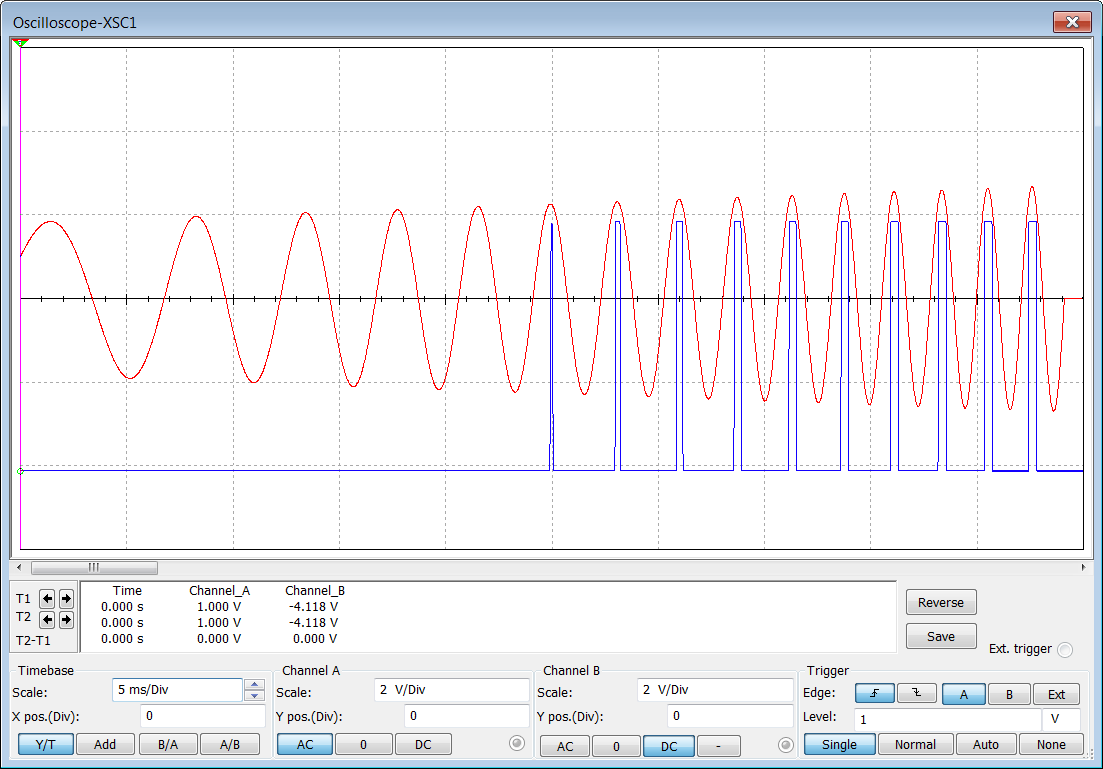
The red trace shows the sine wave from the signal generator at the non-inverting input and the blue trace shows the output of the comparator.

This circuit works well enough for a slow constantly changing signal but what about a rapidly changing and varying one.  If we had an input signal that was constantly varying between 1.75V and 2.5V the output would change state all of the time and not give a reasonable output.  At that point we need to introduce something known as Hysteresis.

Hysteresis can be a complicated concept to understand, it can be related to several things in science and engineering.  Here is a definition of it:

Wikipedia entry for Hysteresis

So what actually does Hysteresis mean - Feedback the output of a system into one of the inputs to allow the system to function between values with an upper and lower range.  So in the case of the circuit above feedback the output to the inverting input and that causes the circuit to now change state when the input voltage is between two fixed ranges that the designer can calculate.  Cool huh!

Why do we need hysteresis?  Well for a varying amplitude input signal...not a repetitive sine wave without hysteresis the output will change state continuously.  In simpler terms the output will change state erratically:


If we expand the sections where we can see that the output has changed with respect to the input we can see the following:


What this shows is that the output is struggling to keep up with the input.  Even though the voltage at the input is above the threshold voltage of 2.25V the output doesn't always change state and when it does the time that it's on for varies considerably.  We can prevent this from happening by added some positive feedback and introducing hysteresis.

We add positive feedback by adding some resistors from the output back to the inverting input.  Here is the updated circuit diagram:

Lets choose some parameters.  Lets say we want out output to be high (LED on) when the input signal is between 2V and 2.25V.  Those are known as the Upper threshold voltage Vin1 and the Lower threshold voltage Vin2.

We can then apply some Ohm's law and calculate some resistor values needed to introduce these threshold voltages.

It's at this point we might need a diagram to explain things - here is the classic Hysteresis diagram which is supposed to help explain what we need to achieve.

It never really helped me though I must admit!  What I believe its meant to show is a graph of the voltages expected.  Vout is going to be 5V as that is the maximum possible voltage we can get from the op-amp supply.  Vin varies but is between Vin1 and Vin2

We have already said that Vin1 and Vin2 are 2.5V and 2.0V

Lets label the diagram just to make it easier to understand:
Now lets use Ohms law in various forms to generate those voltages and introduce Hysteresis.  I must admit this bit is hard...I will try and keep things simple...

We want to cause the output VT (5V) to change when the input is between 2V and 2.5V.
Now we need to calculate the value of the R3 to get the voltages we need.  If we apply ohms law to every part of the circuit with the information we know we can re-arrange things to solve for the resistor values.

There are several ways we can solve this.  Lets choose a value for R3 and then insert the numbers and solve for R5. Lets set R3 = 10k There are lots of formulas to work with (I hate mathematics)

Vin1 = VREF * (R5 + R3) / R3

Vin1 = 2.5 V

VREF = 2.25 V

R5 = ?

R3 = 10k or 10000 Ohms

We now need to rearrange the formula to solve for R5

Vin1 * R3 = VREF * (R5 + R3)

(Vin1 * R3) / VREF =  R5 + R3

((Vin1 * R3) / VREF ) - R3  =  R5

Lets know re-write the formula with R5 on the left just for completeness:

 R5 = ((Vin1 * R3) / VREF ) - R3

Lets now insert the values and calculate R5:

R5 = ((2.5 * 10000) / 2.25 ) - 10000

R5 = (25000 / 2.25) - 10000

R5 = 1111. 11111111 Ohms.  Lets use a 1k resistor as it is the closest E24 series resistor value.

This will change the Vin2 value so for completeness lets calculate what that value will be:

Vin2 = (VREF * (R5 + R3) - VCC * R5) / R3

Lets insert the values and perform the calculation:

Vin2 = (2.25 * (1000 + 10000) - 5 * 1000) / 10000

Vin2 = (24750 - 5000) / 10000

Vin2 = 1.975 V close enough for our purposes.  If you need a value closer to 2 Volts for the Vin2 then change R5 to a slightly larger value.

We can now update the Hysteresis diagram just for completeness:
The circuit diagram can all be updated with the resistor values for R3 and R5:
If we re-run the simulation we can see the results from the oscilloscope screen:


When displaying the results of hysteresis most textbooks favour a triangular wave input so just for fun here is what the output looks like with a triangular wave input:

What this shows clearly are the values of Vin1 and Vin2, Which according to the simulation are 2.294V and 1.991mV.  This is close enough to the calculated values to be acceptable.

I wouldn't normally use a 741 Op-Amp to make a comparator.  I would use a specific comparator like the LM311.  Its specifically designed for the purpose and is easy to use.  Here is the circuit diagram for achieving the same results:


It performs exactly the same as the 741 circuit with less components and already has hysteresis - Win!  There are also lots of online calculators to make it easy for the aspiring designer.

Hysteresis Calculator

Well...that's about all for now.  I might update the pages with actual circuits and a video.

Take care - Langster